Turtle Beach Vulcan II specifications and in-depth review

Turtle Beach Vulcan II

Manufacturer: Turtle Beach

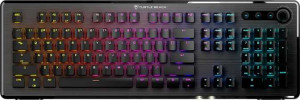
The Turtle Beach Vulcan II is a full-size mechanical gaming keyboard built around a low-profile design, available in both black and white colorways. It ships with a wrist rest and adjustable feet, and its detachable USB cable adds a degree of convenience for transport or cable management. The plastic chassis keeps the overall construction straightforward, and the standard ANSI key layout means no surprises when it comes to keycap compatibility.

Under the hood, the Vulcan II uses Titan II Optical Red switches, a linear optical type with a 1.4 mm actuation point, 46 g actuation force, and 3.6 mm total travel distance. The keyboard polls at 1000 Hz over USB and supports full N-key rollover, ensuring every simultaneous keypress is registered accurately. Media functions are accessible via an Fn layer, and a rotary dial is included for on-the-fly adjustments. Keycaps are ABS plastic in an OEM profile, and per-key RGB lighting is supported across the full layout.

Pros
  • Full N-key rollover ensures every simultaneous keypress is registered without ghosting
  • Includes a wrist rest and adjustable feet, offering ergonomic flexibility out of the box
  • Optical linear switches with a fixed 1.4 mm actuation point provide a consistent and smooth keystroke
  • Detachable cable simplifies transport and cable management
  • Per-key RGB backlighting is supported across the full layout
  • A rotary dial allows quick adjustments without navigating software menus
Cons
  • Switches are not hot-swappable, so replacing them requires soldering
  • No support for QMK, ZMK, or VIA firmware, limiting keyboard customization options
  • Media keys are only accessible via the Fn layer, with no dedicated media controls
  • ABS keycaps are more prone to shine and wear over time compared to PBT alternatives
  • Rapid trigger, adjustable actuation, and analog input are all absent
  • Warranty period is limited to one year
Who is this for?

This keyboard suits users who want a full-size layout with low-profile optical switches for fast, responsive input in gaming sessions. The fixed 1.4 mm actuation point and linear feel make it a comfortable choice for those who prefer light, smooth keystrokes over tactile or clicky feedback. The included wrist rest, adjustable feet, and RGB backlighting also make it a practical option for users building a dedicated gaming desk setup where ergonomics and aesthetics both matter. N-key rollover support further benefits anyone who regularly presses multiple keys simultaneously.

Who is this NOT for?

Users who want to customize or remap their keyboard through open-source firmware will find this keyboard limiting, as it lacks QMK, ZMK, and VIA support entirely. Those who prefer building or experimenting with their switches will also be disappointed, since the switches are not hot-swappable. The keyboard is equally unsuitable for on-the-go or travel use, given its full-size form factor, 948 g weight, and wired-only connectivity. Users who rely heavily on dedicated media controls will need to work within the constraints of the Fn-layer system, which may not suit fast-paced workflows.

General info:

Keyboard type Gaming, Mechanical
Keyboard layout size Full (100%)
Profile Low-profile
connectivity Wired
connection type USB
polling rate 1000 Hz
designed for Mac
has a detachable cable
height 152 mm
width 463 mm
thickness 33 mm
weight 948 g
warranty period 1 years

The Turtle Beach Vulcan II is a full-size (100%) low-profile mechanical gaming keyboard that connects via wired USB with a 1000 Hz polling rate, and it includes a detachable cable for added convenience. It is not designed for Mac use. Physically, it measures 463 mm wide, 152 mm tall, and 33 mm thick, with a weight of 948 g. The keyboard carries a one-year warranty.

Design:

has RGB lighting
Has a backlit keyboard
Case material Plastic
Case colors Black, White
has adjustable feet
includes a wrist rest

The Vulcan II is built with a plastic case and is available in both black and white colorways. It features a fully backlit keyboard with RGB lighting, allowing for per-key color customization. The keyboard also ships with a wrist rest included, and adjustable feet let users set their preferred typing angle.

Switches:

Switch type Optical
Switch feel Linear
Hot-swappable switches
Switch name Titan II Optical Red
Actuation distance (min) 1.4 mm
Actuation distance (max) 1.4 mm
Actuation force 46 g
Total travel distance 3.6 mm

The Vulcan II uses Titan II Optical Red switches, which are optical in type and linear in feel, offering a smooth keystroke without tactile bump or audible click. The actuation point sits at a fixed 1.4 mm with an actuation force of 46 g, and total travel distance measures 3.6 mm. The switches are not hot-swappable, so they cannot be replaced without soldering.

Features:

has analog input
has rapid trigger
has dual actuation
has adjustable actuation
has NKRO
has USB passthrough
Has a display
has QMK support
has ZMK support
has VIA support

The Vulcan II supports N-key rollover (NKRO), ensuring every simultaneous keypress is accurately registered. Beyond that, the feature set is fairly limited — the keyboard does not offer analog input, rapid trigger, dual actuation, or adjustable actuation point functionality. There is no USB passthrough port, no built-in display, and no support for QMK, ZMK, or VIA firmware customization.

Keys & layout:

Keyboard layout ANSI (United States)
Keycap type ABS
Keycap profile OEM
uses a standard key layout
Media keys Via Fn key
has a rotary dial

The Vulcan II uses a standard ANSI (United States) layout, making it compatible with widely available replacement keycaps. The keycaps themselves are ABS plastic in an OEM profile, and the overall key arrangement follows a standard layout with no unusual sizing. Media controls are accessible via the Fn key rather than dedicated keys, and a rotary dial is included for quick on-the-fly adjustments.
Final Verdict

The Turtle Beach Vulcan II is a well-defined full-size gaming keyboard that delivers on the fundamentals — smooth linear input via its Titan II Optical Red switches, ergonomic additions like a wrist rest and adjustable feet, and reliable N-key rollover for simultaneous keypress accuracy. Its wired USB connection, RGB backlighting, and standard ANSI layout make it a straightforward, no-fuss option for gamers who want a consistent and comfortable setup without complex configuration. That said, the absence of hot-swap support, open-source firmware compatibility, and advanced actuation features means it has little to offer users who value deep customization. For those whose needs align with its focused feature set, the Vulcan II holds up as a capable and practical gaming keyboard.