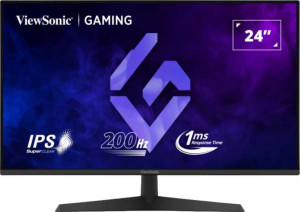
The ViewSonic VX2429 features a 23.8-inch LED-backlit IPS LCD panel with a 1920x1080 resolution and a pixel density of 92 ppi. Its 200Hz refresh rate paired with a 1ms response time makes it well-suited to fast-moving content, and AMD FreeSync Premium adaptive sync helps reduce screen tearing. The panel offers wide 178-degree viewing angles both horizontally and vertically, and comes with a matte, anti-glare coating — it is not a glossy or touch-enabled display.
Classified as a gaming monitor, the ViewSonic VX2429 measures 540 mm wide, 316 mm tall, and 48 mm thick, with a total weight of 3100 g. Its stand supports tilt, swivel, and portrait-mode rotation, and the display is also VESA mount compatible for those who prefer a third-party arm or wall bracket. Operating temperatures range from 0 °C to 40 °C, and the unit has a total volume of 8190.72 cm³.
The display reproduces 16.7 million colors at an 8-bit depth, with a 102% sRGB coverage that extends slightly beyond the standard color space. Typical brightness is rated at 250 nits, and the contrast ratio sits at 1000:1. Color calibration is supported, giving users the ability to adjust and fine-tune color output to their preference.
The ViewSonic VX2429 offers a straightforward video input selection with two HDMI 2.0 ports and one DisplayPort output, along with a 3.5mm audio jack for headset or speaker connectivity. It does not include any USB ports, USB Type-C, DVI, VGA, or mini DisplayPort connections, and there is no support for Thunderbolt, Ethernet, Wi-Fi, or AirPlay.
The ViewSonic VX2429 draws 20W during normal operation and drops to just 0.5W in standby mode, reflecting a modest power footprint for day-to-day use.
The ViewSonic VX2429 includes built-in stereo speakers rated at 2x2W, providing basic audio output without the need for external speakers. It does not support Picture-in-Picture, Dolby Digital, Dolby Digital Plus, or DTS Surround, and there is no ambient light sensor, front camera, or remote control included. Smart TV functionality is also absent, keeping the feature set focused on its role as a desktop monitor.