Xencelabs Pen Display 16 specifications and in-depth review

Xencelabs Pen Display 16

Manufacturer: Xencelabs

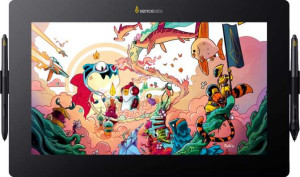
The Xencelabs Pen Display 16 is a drawing tablet with an integrated screen, designed for creative professionals working across Windows, Mac, and Chromebook systems. It features a 15.6″ display with a 3840 x 2160 pixel resolution, delivering a pixel density of 282 ppi. The unit weighs 1,210 g and has fold-out legs for angled positioning, along with a detachable cable for easier cable management. Eight physical buttons are built into the tablet body, and a stylus is included in the box.

The display covers 98% of the Adobe RGB color space and reaches a typical brightness of 300 nits, with a contrast ratio of 100,000:1. The active drawing area measures 344.2 x 193.6 mm², and the included pen supports 8,192 pressure levels at a resolution of 5,080 LPI, with tilt sensitivity up to 60°. The tablet connects via cable only, with no wireless, Bluetooth, HDMI, or DisplayPort connectivity on board, and does not include a 3.5 mm audio jack or a travel bag.

Pros
  • The 4K resolution across a 15.6″ screen results in a pixel density of 282 ppi, producing sharp and detailed image rendering on the drawing surface
  • 98% Adobe RGB color coverage supports accurate color work across a wide gamut
  • A contrast ratio of 100,000:1 provides strong differentiation between light and dark tones
  • The pen registers 8,192 pressure levels at 5,080 LPI with tilt support up to 60°, allowing for nuanced and responsive mark-making
  • Fold-out legs and a detachable cable make desk setup and cable management more practical
  • Compatible with Chromebook, Windows, and Mac, allowing use across multiple operating systems
Cons
  • No anti-reflection coating on the screen, which may cause glare under bright lighting conditions
  • Wireless use is not supported, requiring a physical cable connection at all times
  • No HDMI, DisplayPort, or mini DisplayPort outputs are available, limiting video connectivity options
  • Bluetooth is not built in, restricting wireless peripheral or device pairing
  • A pen stand is not included, leaving no dedicated storage solution for the stylus
  • No travel bag is included, making transport of the device less convenient
Who is this for?

This pen display suits artists and designers who rely on accurate color reproduction, as 98% Adobe RGB coverage and a 100,000:1 contrast ratio provide a dependable visual reference for color-sensitive work such as illustration, photo retouching, or digital painting. The pen's 8,192 pressure levels and 60° tilt support make it well-matched for users who require responsive and nuanced stylus input. The tablet's compatibility with Chromebook, Windows, and Mac also makes it a practical choice for those who work across different operating systems or switch between machines regularly.

Who is this NOT for?

Users who need to work in brightly lit environments may find this display limiting, as the absence of an anti-reflection coating can result in noticeable glare that interferes with visibility. Those who require flexibility to work untethered will be constrained by the lack of wireless connectivity, since the tablet must remain physically cabled at all times. Additionally, users who rely on standard video output ports such as HDMI or DisplayPort for connecting to external displays or other equipment will find no such options available on this device.

General info:

Type Pen display
Compatibility Chromebook, Windows, Mac
Has a display
active drawing area 344.2 x 193.6 mm²
number of tablet buttons 8
Can be used wirelessly
volume 1276.248 cm³
has a socket for a 3.5 mm audio jack
has fold-out legs
pen stand included
has a detachable cable
weight 1210 g
width 410 mm
thickness 12 mm
height 259.4 mm
travel bag is included
Stylus included

The Xencelabs Pen Display 16 is a pen display type drawing tablet compatible with Chromebook, Windows, and Mac systems. It features an active drawing area of 344.2 x 193.6 mm² and includes eight physical buttons on the tablet body alongside a built-in display. The unit measures 410 mm wide, 259.4 mm tall, and 12 mm thick, with a total volume of 1,276.248 cm³ and a weight of 1,210 g. Fold-out legs and a detachable cable are included, adding some flexibility in how the tablet is set up and stored. A stylus comes in the box, though a pen stand and travel bag are not included. The tablet cannot be used wirelessly and does not have a 3.5 mm audio jack.

Display:

screen size 15.6"
resolution 3840 x 2160 px
pixel density 282 ppi
has anti-reflection coating
brightness (typical) 300 nits
contrast ratio 100000:1
Adobe RGB coverage 98%

The display measures 15.6″ and renders at a 3840 x 2160 pixel resolution, resulting in a pixel density of 282 ppi. Typical brightness is rated at 300 nits, and the contrast ratio reaches 100,000:1. Color reproduction covers 98% of the Adobe RGB color space, making it well-suited for color-sensitive work. The screen does not feature an anti-reflection coating.

Pen:

pen pressure levels 8192
pen resolution 5080 LPI
Has tilt sensitivity
pen tilt capacity 60°

The included pen supports 8,192 levels of pressure sensitivity and operates at a resolution of 5,080 LPI, allowing for precise input across the drawing surface. Tilt sensitivity is supported, with a tilt capacity of up to 60°, enabling more natural variation in stroke width and shading based on pen angle.

Connectivity:

HDMI ports 0
DisplayPort outputs 0
Has Bluetooth
mini DisplayPort outputs 0

On the connectivity side, this tablet does not include HDMI, DisplayPort, or mini DisplayPort outputs, and Bluetooth is not built in. The available connection options are limited to what is provided outside of these standard video and wireless interfaces.

Final Verdict

The Xencelabs Pen Display 16 is a capable drawing tablet built around a 15.6″ 4K display with strong color credentials, particularly its 98% Adobe RGB coverage and high contrast ratio, which make it a reliable tool for illustration, digital painting, and color-critical design work. The pen input holds up well on paper, with 8,192 pressure levels and 60° tilt support providing the kind of responsiveness that detail-oriented workflows demand. Connectivity is limited and the screen lacks anti-reflection treatment, which will matter depending on how and where the tablet is used — but for those working in controlled environments across Windows, Mac, or Chromebook systems, it covers the core requirements of a professional pen display without unnecessary compromise.

Popular Comparisons

Xencelabs Pen Display 16
VS
Wacom Movink 13
Wacom Movink 13