XP-Pen Deco 640 specifications and in-depth review

XP-Pen Deco 640

Manufacturer: XP-Pen

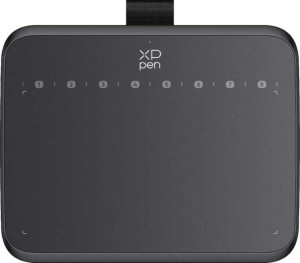
The XP-Pen Deco 640 is a compact pen tablet designed for digital drawing and creative work on Windows, Mac, and Chromebook systems. Its slim profile — just 7 mm thick — makes it easy to work with at a desk without taking up excessive space, and the included stylus pairs with the tablet through a single USB-C connection.

On the technical side, the stylus offers 16384 levels of pressure sensitivity alongside a resolution of 5080 LPI and a report rate of 220 RPS, with tilt sensitivity supported up to 60 degrees and two pen buttons for added control. The tablet has no physical buttons of its own, connects via a detachable USB-C cable without wireless or Bluetooth options, and has an active drawing surface measuring 160 x 90 mm.

Pros
  • The pen offers 16384 pressure levels and 5080 LPI resolution, providing precise input for detailed drawing work
  • Tilt sensitivity up to 60 degrees allows for more natural, angle-aware strokes
  • The detachable cable keeps the setup tidy and makes the cable easier to replace if needed
  • A slim 7 mm thickness makes the tablet easy to place on a desk without occupying excessive vertical space
  • Compatible with Chromebook, Windows, and Mac, covering a broad range of operating systems
  • The USB-C connection is a modern, reversible standard that is widely supported
Cons
  • No wireless or Bluetooth support means the tablet always requires a physical cable connection
  • No physical tablet buttons are available, removing the option for customizable shortcut keys on the device itself
  • No pen stand is included, so storing the stylus safely requires a separate solution
  • The active drawing area of 160 x 90 mm is relatively small, which may feel limiting for users who prefer more drawing space
Who is this for?

This tablet is a solid fit for beginners and intermediate digital artists who need a reliable drawing surface for everyday creative tasks. The 16384 pressure levels and 60° tilt sensitivity provide enough precision for illustration, sketching, and photo editing without overwhelming a new user, while compatibility with Chromebook, Windows, and Mac makes it accessible across a wide range of setups. Its slim, lightweight form factor also suits users who work at a fixed desk and prefer a compact, low-profile device that does not crowd their workspace.

Who is this NOT for?

Users who rely on customizable shortcut buttons directly on the tablet will find this device limiting, as it has no physical keys for workflow shortcuts. The active drawing area of 160 x 90 mm is likely to feel restrictive for professionals or experienced artists who work on large, detailed compositions and need a wider surface to move across naturally. Additionally, anyone requiring a wireless or cable-free setup will not be accommodated, since the tablet offers no Bluetooth or wireless connectivity option.

General info:

Type Pen tablet
Compatibility Chromebook, Windows, Mac
Has a display
active drawing area 160 x 90 mm²
number of tablet buttons 0
Can be used wirelessly
volume 196.084 cm³
has a socket for a 3.5 mm audio jack
has fold-out legs
pen stand included
has a detachable cable
width 149 mm
thickness 7 mm
height 188 mm
travel bag is included
number of microphones 0
Stylus included

The XP-Pen Deco 640 is a pen tablet compatible with Chromebook, Windows, and Mac systems, offering an active drawing area of 160 x 90 mm within a slim body measuring 149 x 188 x 7 mm and a volume of 196.084 cm³. It ships with a stylus included and features a detachable cable for a tidier setup, while it has no physical tablet buttons, no fold-out legs, and no pen stand in the box. Wireless use, Bluetooth, a 3.5 mm audio jack, microphones, and a travel bag are all absent from this configuration.

Display:

Pen:

pen pressure levels 16384
pen resolution 5080 LPI
report rate 220 RPS
Has tilt sensitivity
pen tilt capacity 60°
number of pen buttons 2

The included pen supports 16384 levels of pressure sensitivity and a resolution of 5080 LPI, delivering precise input across the drawing surface at a report rate of 220 RPS. It also features tilt sensitivity with a capacity of up to 60°, allowing for more natural stroke variation, and comes with 2 buttons on the barrel for quick access to secondary functions.

Connectivity:

Has Bluetooth
USB 3.2 Gen 1 ports (USB-C) 1

The Deco 640 connects to a host device through a single USB 3.2 Gen 1 USB-C port and does not include Bluetooth, making it a wired-only peripheral.

Final Verdict

The XP-Pen Deco 640 is a straightforward pen tablet that delivers where it counts for entry-level and intermediate users — particularly through its 16384 pressure levels and 60° tilt sensitivity, which give the stylus a responsive, natural feel suited to everyday illustration and digital painting. Its slim build and broad OS compatibility add practical convenience, though the absence of tablet shortcut buttons, a modest active drawing area, and wired-only connectivity mean it is best matched to users with modest workflow demands rather than professionals seeking a fully featured setup. For anyone stepping into digital drawing or looking for a compact, no-frills tablet for light creative work, the Deco 640 covers the essentials competently.