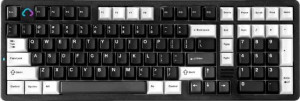
The YUNZII AL98 is a mechanical keyboard with a full 96% layout and standard profile, built around a gasket mount for its structural foundation. It supports wireless and wired connectivity via Bluetooth 5.0, 2.4GHz wireless, and USB, with a polling rate of 1000Hz and a rated battery life of 960 hours. The keyboard measures 407 x 137 x 44mm and weighs 2175g, includes a detachable cable, and is designed with Mac key support. A one-year warranty is included.
The AL98 features a case constructed from plastic and aluminum with an aluminum plate, and is available in black, white, and pink colorways. It includes a backlit keyboard with south-facing RGB lighting and comes with adjustable feet for typing angle customization. A wrist rest is not included with the keyboard.
The AL98 comes equipped with the YUNZII Milk V2 Linear Switch, a mechanical linear switch with an actuation point of 2mm, an actuation force of 40g, and a total travel distance of 3.6mm. The board supports hot-swappable switches, allowing the switches to be replaced without soldering.
The AL98 supports QMK and VIA, giving users flexibility for key remapping and firmware customization, and includes full NKRO for simultaneous keypress registration. It does not support ZMK, analog input, rapid trigger, dual actuation, adjustable actuation, USB passthrough, or an onboard display.
The AL98 uses an ANSI (United States) layout with a standard key arrangement and PBT double-shot keycaps in a Cherry profile. Media functions are accessible via the Fn key rather than dedicated keys, and the keyboard does not include a rotary dial.