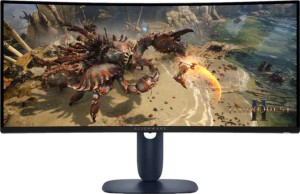
Dell Alienware AW3425DWM 34" specifications and in-depth review

Dell Alienware AW3425DWM 34"

Manufacturer: Dell

The Dell Alienware AW3425DWM 34″ is an ultrawide gaming monitor designed for immersive experiences. With a screen size of 34″ and a 3440 x 1440 resolution, this display offers detailed visuals suitable for gaming and multimedia tasks.

It features a 180Hz refresh rate for smooth motion and supports AMD FreeSync for adaptive synchronization. The monitor’s VA, LCD, LED-backlit display provides a contrast ratio of 3000:1, and the panel is glossy with a typical brightness of 400 nits. It includes two HDMI ports, one DisplayPort 1.4, and three USB ports for connectivity.

Pros
  • Supports AMD FreeSync for smooth gaming and reduced screen tearing.
  • Has a 180Hz refresh rate for fluid motion, ideal for fast-paced gaming.
  • Offers a 3440 x 1440 resolution for sharp, detailed visuals in an ultrawide format.
  • Includes PiP (Picture-in-Picture) functionality for multitasking with multiple input sources.
  • VESA mount support for flexible installation options.
Cons
  • Does not support USB Type-C or Thunderbolt for faster data transfer or external device connectivity.
  • Lacks stereo speakers, requiring external audio solutions for sound output.
  • No support for Dolby Digital, DTS Surround, or other advanced audio technologies.
  • Does not have a front camera or any smart TV capabilities.
  • Glossy panel may cause reflections in brightly lit environments, impacting visibility.
Who is this for?

The Dell Alienware AW3425DWM 34″ is ideal for gamers and professionals who require a high refresh rate and sharp visuals for an immersive experience. With its 3440 x 1440 resolution and 180Hz refresh rate, it excels in fast-paced gaming or high-performance tasks. Its AMD FreeSync support also ensures smooth gameplay, reducing screen tearing. Additionally, its large ultrawide screen is perfect for multitasking or for users who enjoy an expansive display setup.

Who is this NOT for?

This monitor is not ideal for users seeking a portable or versatile display. Its lack of USB Type-C or Thunderbolt support limits compatibility with modern external devices, and its glossy panel may cause visibility issues in brightly lit environments. Additionally, the absence of stereo speakers and support for advanced audio formats like Dolby Digital or DTS Surround makes it less suitable for media consumption or users who prioritize integrated audio solutions.

Display:

Display type VA, LCD, LED-backlit
response time 4 ms
screen size 34"
resolution 3440 x 1440 px
pixel density 110 ppi
Adaptive synchronization AMD FreeSync
has anti-glare coating
refresh rate 180Hz
maximum horizontal viewing angle 178º
maximum vertical viewing angle 178º
has a matte panel
has a glossy panel
has a touch screen

The Dell Alienware AW3425DWM 34″ display features a VA, LCD, LED-backlit panel with a 3440 x 1440 resolution and a 180Hz refresh rate, delivering smooth visuals for gaming and multimedia. It offers a pixel density of 110 ppi and supports AMD FreeSync for adaptive synchronization. With a 178º maximum horizontal and vertical viewing angle, it ensures consistent image quality from different perspectives. The display is glossy, with an anti-glare coating to reduce reflections, but it does not include a touch screen.

General info:

Type Ultrawide, Gaming
release date March 2025
supports total tilt
Has a swivel stand
Supports VESA mount
height 360.85 mm
width 805.45 mm
thickness 132.46 mm
weight 9090 g
supports portrait mode
maximum operating temperature 40 °C
lowest potential operating temperature 0 °C
volume 38499.05294095 cm³

The Dell Alienware AW3425DWM 34″ is an ultrawide, gaming monitor with a height of 360.85 mm, a width of 805.45 mm, and a thickness of 132.46 mm. It supports total tilt for flexible adjustments, but lacks a swivel stand or portrait mode capability. The monitor is VESA mount compatible and weighs 9090 g. Designed for various environments, it operates between 0°C and 40°C and has a volume of 38499.05 cm³.

Colors:

brightness (typical) 400 nits
supports color calibration
display colors 1070 million
bit depth 10-bit
contrast ratio 3000:1

The Dell Alienware AW3425DWM 34″ features a typical brightness of 400 nits and supports color calibration for accurate color representation. It displays up to 1070 million colors with a 10-bit depth and a high contrast ratio of 3000:1, ensuring vibrant and detailed visuals for gaming and multimedia applications.

Connectivity:

HDMI ports 2
supports Thunderbolt
DisplayPort outputs 1
DisplayPort version DisplayPort 1.4
has a socket for a 3.5 mm audio jack
has a DVI connector
USB ports 3
Has USB Type-C
supports Ethernet
supports Wi-Fi
has AirPlay
mini DisplayPort outputs 0
has a VGA connector

The Dell Alienware AW3425DWM 34″ offers a solid range of connectivity options, including two HDMI ports and one DisplayPort 1.4 output. It also features three USB ports for additional peripherals, though it does not support Thunderbolt, USB Type-C, or Ethernet. Additionally, it lacks a headset jack, DVI connector, and VGA connector, limiting some traditional connection options.

Power:

operating power consumption 32W
standby power consumption 0.3W

The Dell Alienware AW3425DWM 34″ operates with a typical power consumption of 32W during use and draws just 0.3W when in standby mode, making it energy-efficient for both operation and idle states.

Features:

has PiP
has stereo speakers
has built-in smart TV
has a remote control
supports Dolby Digital
supports Dolby Digital Plus
has DTS Surround
has an ambient light sensor
has a front camera

The Dell Alienware AW3425DWM 34″ includes a PiP (Picture-in-Picture) feature, allowing users to view multiple sources simultaneously. However, it does not include stereo speakers, a built-in smart TV, or a remote control. It also lacks support for Dolby Digital, DTS Surround, or an ambient light sensor, and does not have a front camera.

Final Verdict

The Dell Alienware AW3425DWM 34″ is a powerful ultrawide gaming monitor, offering a 180Hz refresh rate and 3440 x 1440 resolution that provide smooth, detailed visuals for an immersive experience. Its AMD FreeSync support makes it a strong choice for gamers seeking fluid performance. While it excels in gaming and multitasking, it may not be suitable for users who need advanced audio features or modern connectivity options like USB Type-C. Overall, this monitor is well-suited for gamers and professionals who prioritize high-quality display performance in an ultrawide format.

Popular Comparisons

Dell Alienware AW3425DWM 34"
VS
Asus TUF Gaming VG34VQ3B 34"
Dell Alienware AW3425DWM 34"
VS
Dell Alienware AW3225QF 32"
Dell Alienware AW3425DWM 34"
VS
AOC CU34G2XP/BK 34"
AOC CU34G2XP/BK 34"
Dell Alienware AW3425DWM 34"
VS
Asus ROG Strix XG32WCS 32"
Dell Alienware AW3425DWM 34"
VS
Dell Plus S3425DW 34"
Dell Alienware AW3425DWM 34"
VS
MSI MAG 345CQR 34"
MSI MAG 345CQR 34"