Dell Plus S3425DW 34" specifications and in-depth review

Dell Plus S3425DW 34"

Manufacturer: Dell

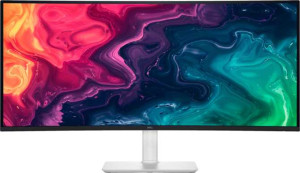
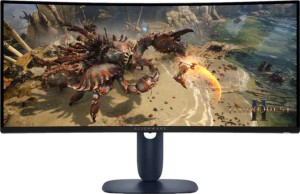
The Dell Plus S3425DW is a 34-inch ultrawide monitor built around a VA LCD panel with LED backlighting. Designed for broad desktop use, it delivers a 3440 x 1440 resolution across its curved ultrawide canvas, resulting in a pixel density of 109 ppi. The display runs at a native refresh rate of 120Hz and supports AMD FreeSync adaptive synchronization, which helps reduce screen tearing during fast-moving content. A glossy panel surface with anti-glare coating is present, and both horizontal and vertical viewing angles reach 178 degrees.

On the connectivity side, the S3425DW offers two HDMI 2.1 ports alongside four USB 3.1 ports, making it straightforward to connect multiple devices. Built-in stereo speakers deliver a combined audio output of 2 x 10W, and a Picture-in-Picture mode is also supported. The display produces up to 1070 million colors with a contrast ratio of 3000:1 and a typical brightness of 300 nits. It supports VESA mounting, and operating power consumption sits at 31W, with standby draw as low as 0.4W.

Pros
  • The 34-inch ultrawide panel with a 3440 x 1440 resolution provides a noticeably wider field of view compared to standard widescreen formats, which suits productivity and multitasking setups
  • Picture-in-Picture support allows two video sources to be viewed on screen at the same time, adding practical flexibility for multi-device workflows
  • The built-in stereo speakers deliver a combined 20W of audio output, removing the need for a separate speaker setup in many desk environments
  • With four USB 3.1 ports and two HDMI 2.1 inputs, the monitor offers a reasonable range of connectivity options for peripheral and source management
  • AMD FreeSync support at 120Hz helps keep motion smooth during fast-moving content without screen tearing
  • VESA mount compatibility allows the monitor to be installed on a wall or third-party arm for more flexible desk arrangements
Cons
  • The stand does not support tilt, swivel, or portrait mode, which significantly limits ergonomic adjustability for different users or setups
  • There are no DisplayPort outputs of any kind, which may be restrictive for users with DisplayPort-only source devices
  • The absence of a 3.5 mm audio jack means wired headphones or external speakers cannot be connected directly to the monitor
  • Ethernet and Wi-Fi are not supported, so the monitor offers no network passthrough or wireless connectivity features
  • Color calibration is not supported, which may be a drawback for users who require precise or profiled color output
  • The EU energy label of F indicates relatively lower energy efficiency for this display class
Who is this for?

This monitor is a practical fit for users who regularly work across multiple applications at once, as the 34-inch ultrawide 3440 x 1440 panel provides ample horizontal screen space for side-by-side layouts without the need for a dual-monitor setup. The 120Hz refresh rate combined with AMD FreeSync also makes it a reasonable choice for casual gaming where smooth motion is a priority. Those who want to consolidate their desk setup will appreciate the built-in 20W stereo speakers and Picture-in-Picture support, along with the VESA mount compatibility that suits users looking to free up desk space with an arm or wall installation.

Who is this NOT for?

Users who require precise color accuracy will find this monitor limiting, as it lacks color calibration support and carries an EU energy label of F, making it a poor fit for professional photo editing or color-critical creative work. The stand offers no tilt, swivel, or height adjustment, which makes it unsuitable for those with specific ergonomic requirements or shared workspaces where multiple people need to reposition the display. Additionally, the absence of DisplayPort outputs and a 3.5 mm audio jack means it is not well-suited for users whose existing hardware relies on those connection types.

Display:

Display type VA, LCD, LED-backlit
response time 5 ms
screen size 34"
resolution 3440 x 1440 px
pixel density 109 ppi
Adaptive synchronization AMD FreeSync
has anti-glare coating
refresh rate 120Hz
maximum horizontal viewing angle 178º
maximum vertical viewing angle 178º
has a matte panel
has a glossy panel
has a touch screen

The Dell Plus S3425DW uses a VA LCD panel with LED backlighting, sized at 34 inches and capable of rendering a 3440 x 1440 resolution at a pixel density of 109 ppi. It supports a 120Hz refresh rate and AMD FreeSync adaptive synchronization to help keep motion smooth. Response time is rated at 5 ms, and both horizontal and vertical viewing angles extend to 178 degrees. The display has a glossy panel surface paired with an anti-glare coating, while matte finish and touch screen functionality are not included.

General info:

Type Ultrawide, Standard
EU energy label F
supports total tilt
Has a swivel stand
Supports VESA mount
height 355.77 mm
width 807.32 mm
thickness 116.89 mm
weight 9130 g
supports portrait mode
maximum operating temperature 40 °C
lowest potential operating temperature 0 °C
volume 33573.173432796 cm³

The Dell Plus S3425DW is classified as an ultrawide standard monitor and carries an EU energy label of F. Its physical dimensions come in at 807.32 mm wide, 355.77 mm tall, and 116.89 mm thick, with a total weight of 9130 g. VESA mount support is included, offering flexibility for wall or arm installations, while tilt adjustment, swivel stand, and portrait mode are not supported. The monitor operates within a temperature range of 0 °C to 40 °C.

Colors:

brightness (typical) 300 nits
supports color calibration
display colors 1070 million
contrast ratio 3000:1

The Dell Plus S3425DW delivers a typical brightness of 300 nits alongside a contrast ratio of 3000:1, which allows for a noticeable distinction between darker and lighter areas of the image. The display is capable of rendering 1070 million colors, contributing to a broad and detailed color presentation. Color calibration is not supported on this monitor.

Connectivity:

HDMI ports 2
supports Thunderbolt
DisplayPort outputs 0
has a socket for a 3.5 mm audio jack
has a DVI connector
USB ports 4
USB version 3.1
HDMI version HDMI 2.1
supports Ethernet
supports Wi-Fi
has AirPlay
mini DisplayPort outputs 0
has a VGA connector

The Dell Plus S3425DW provides two HDMI 2.1 ports for video input, alongside four USB 3.1 ports for peripheral connectivity. There are no DisplayPort, mini DisplayPort, DVI, or VGA outputs available. Wireless options such as Wi-Fi, AirPlay, and Ethernet are not supported, and the monitor also lacks a 3.5 mm audio jack and Thunderbolt compatibility.

Power:

operating power consumption 31W
standby power consumption 0.4W

The Dell Plus S3425DW draws 31W during normal operation and drops to just 0.4W in standby mode, reflecting a relatively low idle power draw when the display is not in active use.

Features:

has PiP
has stereo speakers
has built-in smart TV
audio output power 2 x 10W
has a remote control
supports Dolby Digital
supports Dolby Digital Plus
has DTS Surround
has an ambient light sensor
has a front camera

The Dell Plus S3425DW includes built-in stereo speakers with a combined audio output of 2 x 10W, and supports Picture-in-Picture (PiP), allowing multiple sources to be displayed on screen simultaneously. Audio formats such as Dolby Digital, Dolby Digital Plus, and DTS Surround are not supported, and there is no remote control included. The monitor also does not feature a front camera, an ambient light sensor, or built-in smart TV functionality.
Final Verdict

The Dell Plus S3425DW is a straightforward ultrawide monitor that covers the essentials for productivity-focused and casual multimedia use. Its 34-inch 3440 x 1440 panel with 120Hz refresh rate and AMD FreeSync gives it a solid footing for users who want a wider workspace and smoother motion without investing in a dedicated gaming display. Built-in speakers, Picture-in-Picture support, and VESA compatibility add a degree of practical versatility, though the stand's lack of ergonomic adjustment and the absence of color calibration and DisplayPort connectivity do narrow its appeal. For users whose workflow centers around multitasking and general desktop use, the S3425DW delivers a functional and reasonably featured package, but those with more specialized demands in color accuracy or connectivity flexibility may find its specification set falls short of their needs.

Popular Comparisons

Dell Plus S3425DW 34"
VS
Dell Alienware AW3425DWM 34"
Dell Plus S3425DW 34"
VS
Dell Alienware AW2725DF 27"
Dell Plus S3425DW 34"
VS
MSI Modern MD342CQP 34"
Dell Plus S3425DW 34"
VS
Samsung ViewFinity S6 S34C652VAU 34"