Gigabyte MO27Q2 27" specifications and in-depth review

Gigabyte MO27Q2 27"

Manufacturer: Gigabyte

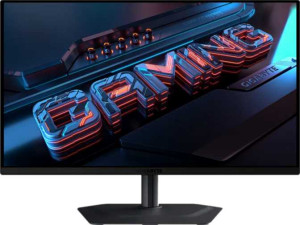
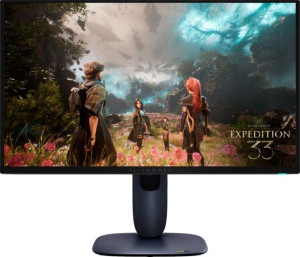
The Gigabyte MO27Q2 is a 27-inch gaming monitor built around an OLED/AMOLED panel, offering a 2560x1440 resolution at 108 ppi alongside a 240Hz refresh rate designed for fluid, responsive gameplay. The matte panel includes an anti-glare coating, and the stand supports tilt, swivel, and portrait orientation, while VESA mount compatibility adds further flexibility for different setups.

On the technical side, the display delivers a 0.03ms response time and a contrast ratio of 1500:1, with 10-bit color depth covering 1.07 billion colors and a typical brightness of 250 nits. Connectivity includes two HDMI 2.1 ports, one DisplayPort 1.4 output, USB Type-C, and four USB ports, complemented by a 3.5mm audio jack and built-in stereo speakers rated at 2x5W. AMD FreeSync support is also present, and power consumption sits at 41W during operation.

Pros
  • The OLED/AMOLED panel combined with a 240Hz refresh rate and 0.03ms response time makes the display highly responsive for fast-paced content
  • Wide 178-degree viewing angles in both directions ensure consistent image quality when viewed from off-center positions
  • The stand supports tilt, swivel, height adjustment, and portrait mode, offering a solid range of ergonomic configurations
  • VESA mount compatibility allows the monitor to be used with third-party arms or wall brackets
  • Connectivity covers two HDMI 2.1 ports, one DisplayPort 1.4, USB Type-C, and four USB ports, providing a broad range of input options
  • 10-bit color depth with support for 1.07 billion colors and color calibration gives users meaningful control over display accuracy
Cons
  • Typical brightness of 250 nits is relatively low, which may limit visibility in brightly lit environments
  • No Thunderbolt support restricts high-bandwidth single-cable workflows
  • The monitor lacks Wi-Fi, Ethernet, and AirPlay, ruling out any wireless connectivity
  • No PiP support means multiple sources cannot be viewed simultaneously on the same screen
  • Absent ambient light sensor means the display cannot automatically adapt brightness to changing room conditions
Who is this for?

This monitor is a strong fit for PC gamers who prioritize fast, responsive gameplay, as the combination of a 240Hz refresh rate, 0.03ms response time, and AMD FreeSync support makes it well-suited for titles where motion clarity and input latency matter. The OLED panel with 10-bit color depth and 1.07 billion colors also makes it a reasonable choice for users who engage in color-sensitive creative work and want calibration control alongside display flexibility. Those who value ergonomic adaptability will benefit from the tilt, swivel, portrait mode, and VESA mount support, which accommodate a variety of desk setups and workflows.

Who is this NOT for?

Users working in brightly lit rooms or sunlit environments may find the 250-nit typical brightness insufficient to maintain comfortable visibility. The absence of Thunderbolt, Wi-Fi, Ethernet, and AirPlay makes this monitor a poor match for those who rely on wireless or high-bandwidth single-cable connectivity, such as MacBook users or professionals in cable-managed workstation setups. Additionally, users who need to monitor multiple sources simultaneously will be limited by the lack of PiP support, making this a less practical option for broadcast, surveillance, or multi-feed workflows.

Display:

Display type OLED/AMOLED
response time 0.03 ms
screen size 27"
resolution 2560 x 1440 px
pixel density 108 ppi
Adaptive synchronization AMD FreeSync
has anti-glare coating
refresh rate 240Hz
maximum horizontal viewing angle 178º
maximum vertical viewing angle 178º
has a matte panel
has a glossy panel
has a touch screen

The Gigabyte MO27Q2 features a 27-inch OLED/AMOLED panel with a 2560x1440 resolution and a pixel density of 108 ppi, delivering a sharp and detailed image across the screen. With a 240Hz refresh rate and an exceptionally fast 0.03ms response time, the display is well-suited for fast-paced content, and AMD FreeSync support helps maintain smooth output. The matte panel includes an anti-glare coating, while horizontal and vertical viewing angles both reach 178 degrees, ensuring consistent visibility from wide positions. The display does not support touch input, and it is not a glossy panel.

General info:

Type Gaming
supports total tilt
Has a swivel stand
Supports VESA mount
height 356.4 mm
width 610.3 mm
thickness 64.2 mm
weight 6700 g
supports portrait mode
volume 13964.201064 cm³

The MO27Q2 is classified as a gaming monitor and offers a reasonable degree of physical flexibility, with support for tilt, swivel, and portrait mode, allowing users to adjust the screen orientation to suit different workflows or preferences. It also supports VESA mounting for those who prefer a third-party arm or wall bracket. The monitor measures 610.3 mm wide, 356.4 mm tall, and 64.2 mm thick, with a total weight of 6700 g and a volume of approximately 13964 cm³.

Colors:

brightness (typical) 250 nits
supports color calibration
display colors 1070 million
bit depth 10-bit
contrast ratio 1500:1

The MO27Q2 handles color output through a 10-bit panel capable of displaying 1070 million colors, paired with a contrast ratio of 1500:1 that allows for a meaningful distinction between light and dark areas of an image. Typical brightness is rated at 250 nits, and the monitor supports color calibration, giving users the ability to fine-tune the display output to meet specific accuracy requirements.

Connectivity:

HDMI ports 2
supports Thunderbolt
DisplayPort outputs 1
DisplayPort version DisplayPort 1.4
has a socket for a 3.5 mm audio jack
has a DVI connector
USB ports 4
Has USB Type-C
HDMI version HDMI 2.1
supports Ethernet
supports Wi-Fi
has AirPlay
mini DisplayPort outputs 0
has a VGA connector

The MO27Q2 provides a well-rounded set of video and data connections, including two HDMI 2.1 ports, one DisplayPort 1.4 output, and USB Type-C, while four USB ports add further peripheral connectivity. A 3.5mm audio jack is also present for headset use. The monitor does not support Thunderbolt, DVI, VGA, or mini DisplayPort, and there are no wireless options such as Wi-Fi, Ethernet, or AirPlay.

Power:

operating power consumption 41W
standby power consumption 0.5W

The MO27Q2 draws 41W during normal operation and drops to a standby power consumption of 0.5W when not in active use.

Features:

has PiP
has stereo speakers
has built-in smart TV
audio output power 2 x 5W
has a remote control
supports Dolby Digital
supports Dolby Digital Plus
has DTS Surround
has an ambient light sensor
has a front camera

The MO27Q2 includes built-in stereo speakers rated at 2x5W, providing basic audio output without the need for external speakers. The monitor does not support PiP, smart TV functionality, Dolby Digital, Dolby Digital Plus, or DTS Surround, and it lacks an ambient light sensor, a front camera, and a remote control.
Final Verdict

The Gigabyte MO27Q2 is a 27-inch OLED gaming monitor that makes a compelling case for users who need fast, color-accurate display performance in a single package — the 240Hz refresh rate, 0.03ms response time, and 10-bit panel with color calibration support cover both competitive gaming and detail-oriented creative tasks reasonably well. Its ergonomic stand, broad input selection including dual HDMI 2.1 and USB Type-C, and VESA compatibility add practical value for varied desktop setups. That said, the 250-nit typical brightness and absence of wireless connectivity or Thunderbolt will be genuine limitations for certain users. Overall, the MO27Q2 is a well-specified monitor for gamers and creative users who work primarily in controlled lighting conditions and can accommodate its connectivity constraints.

Popular Comparisons

Gigabyte MO27Q2 27"
Gigabyte MO27Q2 27"
VS
Dell Alienware AW2725Q 27"
Gigabyte MO27Q2 27"
Gigabyte MO27Q2 27"
VS
Dell Alienware AW2725DF 27"
Gigabyte MO27Q2 27"
Gigabyte MO27Q2 27"
VS
Asus ROG Strix OLED XG27AQDMG 27"
Gigabyte MO27Q2 27"
Gigabyte MO27Q2 27"
VS
Gigabyte Aorus FO27Q3 27"
Gigabyte MO27Q2 27"
Gigabyte MO27Q2 27"
VS
AOC Agon Pro AG276QZD2 27"
Gigabyte MO27Q2 27"
Gigabyte MO27Q2 27"
VS
AOC Q27G4ZD 27“
AOC Q27G4ZD 27“
Gigabyte MO27Q2 27"
Gigabyte MO27Q2 27"
VS
Samsung Odyssey OLED G6 27" (G61SD)
Gigabyte MO27Q2 27"
Gigabyte MO27Q2 27"
VS
MSI MAG 273QP QD-OLED X24 27"