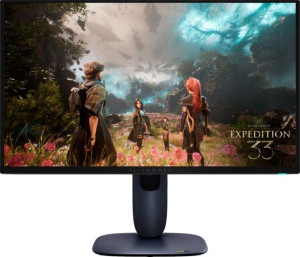
Dell Alienware AW2725Q 27" specifications and in-depth review

Dell Alienware AW2725Q 27"

Manufacturer: Dell

The Dell Alienware AW2725Q is a 27-inch gaming monitor built around a QD-OLED panel that combines high pixel density with a very fast response time. With a native resolution of 3840 x 2160 pixels spread across a 26.7-inch active area, it delivers 166 pixels per inch, producing a sharp and detailed image suited to demanding visual workloads and high-fidelity gaming alike. The display carries an anti-glare, matte coating and supports Picture-in-Picture, while the stand offers swivel adjustment and the panel is also VESA-mount compatible.

On the technical side, the AW2725Q runs at a 240Hz refresh rate with a rated 0.03ms response time, and it supports AMD FreeSync Premium Pro, Nvidia G-Sync Compatible, and VESA Adaptive Sync for flexible frame-rate management. Connectivity includes two HDMI 2.1 ports, one DisplayPort 1.4 output, five USB 3.1 ports with a USB Type-C option, though there is no Ethernet, Wi-Fi, or 3.5mm audio jack. The panel is rated at 250 nits typical brightness, a contrast ratio of 1,500,000:1, and a color depth of 1,070 million colors, while operating power draw sits at 39.4W with a 0.5W standby figure.

Pros
  • The QD-OLED panel delivers a contrast ratio of 1,500,000:1, producing very deep blacks and vivid differentiation between light and dark areas of the image
  • A 240Hz refresh rate combined with a 0.03ms response time makes the display well-suited to fast-paced gaming where motion clarity matters
  • Support for AMD FreeSync Premium Pro, Nvidia G-Sync Compatible, and VESA Adaptive Sync gives the monitor broad compatibility with both major GPU platforms for tear-free gaming
  • With 178-degree horizontal and vertical viewing angles, the image remains consistent when viewed from off-center positions
  • Five USB 3.1 ports including a USB Type-C connection provide a practical hub for peripherals directly through the monitor
  • The swivel stand and VESA mount support offer flexible placement options for different desk setups
Cons
  • Typical brightness is rated at only 250 nits, which may limit visibility in bright ambient lighting conditions
  • The monitor does not support color calibration, reducing its suitability for color-critical professional work
  • There is no 3.5mm headset jack, requiring users to manage audio through separate connections
  • Portrait mode and full tilt adjustment are not supported, limiting ergonomic flexibility
  • No built-in speakers are included, so audio output depends entirely on external devices
  • The EU energy label is rated G, indicating relatively low energy efficiency for its class
Who is this for?

This monitor is well-suited to competitive and immersive gamers who prioritize motion clarity, with its 240Hz refresh rate and 0.03ms response time making it a strong fit for fast-paced titles where responsiveness is critical. The broad adaptive sync support across both AMD and Nvidia platforms means it integrates smoothly into a wide range of gaming rigs without compatibility concerns. Users who want a high-resolution 4K gaming experience on a single 27-inch screen will also find the 3840 x 2160 resolution and 166 ppi density appealing for detailed, sharp visuals. Additionally, the swivel stand, VESA mount support, and five USB 3.1 ports including USB Type-C make it practical for users who value flexible desk ergonomics and peripheral management.

Who is this NOT for?

Users working in color-critical professional fields such as photo editing, print production, or graphic design are likely to find this monitor limiting, as it does not support color calibration and lacks the workflow tools typically expected in those environments. The 250-nit typical brightness makes it a poor fit for brightly lit rooms or environments with strong ambient light, where screen visibility could be compromised. Those who rely on built-in audio — whether for video calls, media consumption, or casual use — will find the absence of speakers and a 3.5mm headset jack inconvenient, and users who need portrait mode or flexible tilt adjustments for vertical workflows or ergonomic setups will be constrained by the stand's limited range of motion.

Display:

Display type QD-OLED, OLED/AMOLED
response time 0.03 ms
screen size 26.7"
resolution 3840 x 2160 px
pixel density 166 ppi
Adaptive synchronization AMD FreeSync Premium Pro, Nvidia G-Sync Compatible, VESA Adaptive Sync
has anti-glare coating
refresh rate 240Hz
maximum horizontal viewing angle 178º
maximum vertical viewing angle 178º
has a matte panel
has a glossy panel
has a touch screen

The Display section of the Dell Alienware AW2725Q centers on a QD-OLED panel measuring 26.7 inches with a 3840 x 2160 pixel resolution and a pixel density of 166 ppi. It operates at a 240Hz refresh rate with a rated response time of 0.03ms, and supports AMD FreeSync Premium Pro, Nvidia G-Sync Compatible, and VESA Adaptive Sync for variable refresh rate management. The panel features a matte, anti-glare coating rather than a glossy surface, and offers wide viewing angles of 178 degrees both horizontally and vertically. It does not support touch input, and is not a glossy panel.

General info:

Type Gaming
EU energy label G
supports total tilt
Has a swivel stand
Supports VESA mount
height 355.97 mm
width 609.51 mm
thickness 72.63 mm
weight 6370 g
supports portrait mode
maximum operating temperature 40 °C
lowest potential operating temperature 0 °C
volume 15758.333161461 cm³

Classified as a gaming monitor, the AW2725Q carries an EU energy label of G and has physical dimensions of 609.51 mm wide, 355.97 mm tall, and 72.63 mm thick, with a total weight of 6370 g. The stand includes a swivel adjustment and the monitor supports VESA mounting, though it does not offer full tilt or portrait mode rotation. Operating temperatures are rated between 0 °C and 40 °C, and the unit's total volume is approximately 15,758 cm³.

Colors:

brightness (typical) 250 nits
supports color calibration
display colors 1070 million
contrast ratio 1500000:1

The AW2725Q has a typical brightness of 250 nits and a contrast ratio of 1,500,000:1, reflecting the deep black levels characteristic of its OLED panel technology. It renders up to 1,070 million colors, enabling a wide and nuanced color range across the display. Color calibration is not supported on this monitor.

Connectivity:

HDMI ports 2
supports Thunderbolt
DisplayPort outputs 1
DisplayPort version DisplayPort 1.4
has a socket for a 3.5 mm audio jack
has a DVI connector
USB ports 5
USB version 3.1
Has USB Type-C
HDMI version HDMI 2.1
supports Ethernet
supports Wi-Fi
has AirPlay
mini DisplayPort outputs 0
has a VGA connector

The AW2725Q provides two HDMI 2.1 ports and one DisplayPort 1.4 output for video input, with no mini DisplayPort, DVI, or VGA connectors present. USB connectivity consists of five USB 3.1 ports, including a USB Type-C port, while Thunderbolt is not supported. The monitor does not include a 3.5mm headset jack, and there is no Ethernet, Wi-Fi, or AirPlay functionality.

Power:

operating power consumption 39.4W
standby power consumption 0.5W

The AW2725Q draws 39.4W during normal operation and drops to a low 0.5W in standby mode.

Features:

has PiP
has stereo speakers
has built-in smart TV
has a remote control
supports Dolby Digital
supports Dolby Digital Plus
has DTS Surround
has an ambient light sensor
has a front camera

The AW2725Q supports Picture-in-Picture (PiP), allowing multiple sources to be displayed on screen simultaneously. Beyond that, the feature set is minimal — the monitor has no stereo speakers, no built-in smart TV functionality, no remote control, and no front camera. Audio-related features such as Dolby Digital, Dolby Digital Plus, and DTS Surround are also absent, and there is no ambient light sensor.
Final Verdict

The Dell Alienware AW2725Q is a purpose-built gaming monitor that makes a strong case for itself through its combination of a 240Hz refresh rate with 0.03ms response time on a QD-OLED panel, delivering the kind of motion clarity and contrast depth that serious gamers prioritize. The 4K resolution, wide adaptive sync compatibility, and practical connectivity options reinforce its position as a well-specified display for high-demand gaming setups. That said, its limited brightness, absent color calibration, and restricted ergonomic adjustments mean it is tailored to a specific audience rather than a universal one. For users whose primary focus is responsive, high-resolution gaming, the AW2725Q delivers a focused and capable package — but those with broader professional or multimedia needs may find its feature set too narrow for everyday versatility.

Popular Comparisons

Dell Alienware AW2725Q 27"
VS
Asus ROG Strix OLED XG27ACDNG 27"
Dell Alienware AW2725Q 27"
VS
Asus ROG Strix OLED XG27UCDMG 27"
Dell Alienware AW2725Q 27"
VS
Asus ROG Strix OLED XG27AQDMG 27"
Dell Alienware AW2725Q 27"
VS
Asus ROG Swift OLED PG27UCDM 27"
Dell Alienware AW2725Q 27"
VS
MSI MPG 274URDFW E16M 27"
Dell Alienware AW2725Q 27"
VS
Gigabyte MO27Q2 27"
Gigabyte MO27Q2 27"
Dell Alienware AW2725Q 27"
VS
Xiaomi Mini LED Gaming Monitor G Pro 27i
Dell Alienware AW2725Q 27"
VS
Samsung Odyssey OLED G8 (G81SF) 27"